1. I’m an ebook newbie. How do I download it?
- After clicking on an ADD TO CART button, you will be given basic windows and prompts to complete your purchase via PayPal.
- TIP: If you do create an account instead of checking out as a guest, you’ll be able to find your download link on your account page if you ever lose it! (NOTE: Purchases made before 2018, will not have an account.)
- Once you’ve paid you will be redirected to a page that says ORDER RECEIVED and a link to your download:
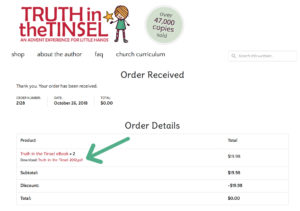
- This is where you download the ebook! Click the download link and it will automatically download for you.
- NOTE: Some browsers will open a PDF in a browser instead of saving it. If you are reading the ebook in a browser OR only viewing it on your phone, please make sure the ebook file is SAVED to your computer/device/cloud and you can read it in Preview or Adobe Reader before you close it instead of clicking your download link every time you read the ebook as you only have 9 download opportunities.
- You will then receive an email with a receipt and download link. If you don’t get this email, please look through your spam folder and/or double-check that you are using the same email you used with Paypal.
- If you pay with an eCheck via Paypal, you will not be sent your download link until the check clears.
2. Can I print multiple copies of the printable ornaments or Christmas trees?
The printable ornaments are original art created for Truth in the Tinsel. You can print multiple copies for your personal home use. If you would like to print multiple copies for your church, school, small group or friends, you can purchase bulk copies at a discounted price. Please see our bulk orders page.
3. My kids are too little/ this looks too hard/ I just didn’t know what I was getting into–will you give me a refund?
As this is a digital product, there are no refunds. Please see a Sample Page and accompanying blog posts for detailed information about each product and our Top Ten Tips post which includes a video of me walking you through the ebook.
4. How do I download it on multiple devices (phone, computer, tablet)?
You have up to 9 download opportunities. Use these to download to all your devices. If you set up an account when you bought the book, you will be able to login and access your download link at any time.
5. I’m having trouble downloading the ebook and/or the printable products. Can you help?
Truth in the Tinsel is a PDF. Any device that can open a PDF can read the book. Problems downloading usually have to do with your reader (Adobe Reader or Preview, etc.) or your browser (Firefox, Safari, Explorer, etc.). Saving your ebook to your computer and using Adobe Reader to view or print it is highly recommended. If you have problems downloading, google your device and PDF (ie. “how to open a PDF on my kindle fire”)
6. Will it print the green background?
It is designed to print without the background. However, if your printer/computer doesn’t have print options, it may print the green background. Please look through your print options and deselect PRINT BACKGROUND. (see my printed page, the ink is not that heavy!) Or simply print at 80% size in black and white to save ink!
7. Can I share my ebook?
If you email, print or give the book to someone else while maintaining a copy for yourself, it would be the same as if you photocopied a book from your bookshelf and gave it away. Please refer to the copyright information at the beginning of the ebook.
8. My computer crashed/my iPad broke/my email was hacked and I lost my Truth in the Tinsel ebook and/or download link. Can you send me another one?
Most bookstores wouldn’t give you a new book if you lost one but we will do our best to accommodate you based on our time and ability to find a record of your purchase. Please email us with any purchase details you can provide. If you purchased your book in or after 2018, you should be able to login your account page and access your download links.
9. My paper chain and printable clues are printing in a weird color!
Try opening the file in Adobe Reader. It seems to print best from there!
10. What is the target age for the book?
I wrote the book when my kids were 3 and 5. But I began doing these type of advent activities when my daughter was only 1. My kids also loved it as Tweens. It works best as a FAMILY activity, so get everyone involved regarldess of age!
11. We’re doing a Swap Party but my friend has a different version of the ebook. Some of the crafts are different!
Because of supply availabilities and changes in our culture, I updated the ebook on it’s 5th birthday. You can see the 2 differences here.